
How to Choose the Right CCTV System for Your Needs?
Security is no longer a luxury in Nepal. Whether you run a retail store, manage a warehouse, or just want to keep an eye on your front door, picking the right CCTV system is one of the smartest investments you can make. And yes, it can feel overwhelming. Dome cameras, IP cameras, 4K resolution, NVR, DVR, the jargon alone is enough to make your head spin.
But don’t worry. By the end of this guide, you’ll know exactly what to look for and what to skip.
Why Choosing the Right CCTV System Actually Matters?
Not all security cameras are created equal. A blurry, low-resolution camera that fails at night isn’t security, it’s a false sense of comfort. A proper CCTV system does more than record footage. It deters theft, provides legal evidence, protects your staff, and in many cases, reduces your insurance premiums too.
According to CCTV Security Pros, the very first step before buying any camera system is to assess your specific needs, because the requirements of a sprawling business campus versus a small apartment are vastly different.
So before you spend a single penny, ask yourself:
- What areas need to be monitored?
- Do you need indoor, outdoor, or both types of cameras?
- Is remote monitoring important to you?
- What is your realistic budget?
Answer these honestly. They’ll guide every decision that follows.
Step 1: Understand the Types of CCTV Cameras
There’s no single “best camera.” The right choice depends on your environment and goals.
IP Cameras (Internet Protocol)
IP cameras are the modern standard. They transmit high-quality digital video over a network to a Network Video Recorder (NVR). According to CCTV Camera World, if you already have CAT5e or CAT6 wiring in your building, IP cameras are a natural and practical choice.
The resolution advantage is hard to ignore. IP cameras can reach up to 4K and beyond, making face recognition and license plate identification far more reliable. The trade-off? They’re generally more expensive upfront and depend on a stable network connection.
HD Over Coax Cameras
If your building already has existing coaxial cabling, you don’t necessarily need to rewire everything. HD over coax cameras bring high-definition quality to your existing infrastructure. As noted by CCTV Camera World, these systems support resolutions up to 4K over coax, making them a cost-effective upgrade path for older setups.
Dome Cameras vs Bullet Cameras
Shape matters more than you’d think.
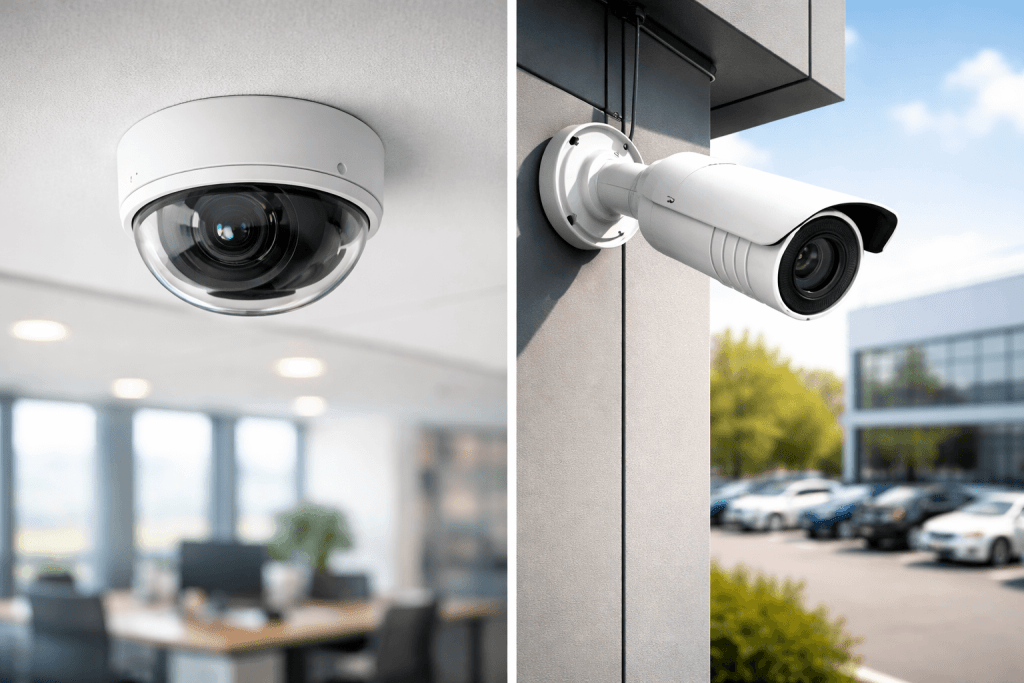
Dome cameras feature a rounded, discreet housing that hides the exact direction the lens is pointing. This creates uncertainty for potential intruders and makes them a popular choice for indoor spaces like offices, retail stores, and hotel lobbies.
Bullet cameras are more visible and cylindrical. Their obvious presence acts as a deterrent, and their design works well for long-distance outdoor monitoring, such as parking lots and building perimeters.
PTZ Cameras (Pan-Tilt-Zoom)
PTZ cameras let you remotely control the direction and zoom of the lens. They’re ideal for large open spaces like warehouses, stadiums, or public areas where a single camera needs to cover a wide, dynamic zone.
Step 2: Nail Down the Right Resolution
Resolution is one of the biggest decision factors and also one of the most misunderstood.
Here’s the practical breakdown:
- 1080p (Full HD): The minimum acceptable standard for modern surveillance. Good for general coverage.
- 2K / 4MP–5MP: Noticeably better detail. It can cover larger areas while still picking up faces and license plates.
- 4K (Ultra HD): The highest common standard. Best for critical areas like entrances, cash registers, or parking lots.
According to HD Security & Support, you should aim for at least 1080p HD as a baseline and move to 2K or 4K for areas where identifying faces or plate numbers is critical.
One important caveat: higher resolution means more storage consumption and more network bandwidth. As Reolink points out, if your network isn’t fast or stable enough, your cameras may actually downgrade their live stream quality in real time. So factor your infrastructure into your resolution decision.
Step 3: Don’t Ignore Night Vision
A camera that goes blind after sunset is about as useful as a guard dog that’s scared of the dark.
Most quality CCTV cameras use infrared (IR) LEDs for night vision. These LEDs illuminate the area with light that only the camera can detect. You might notice a faint red glow around the lens, but that’s it. The resulting footage is typically in black and white.
For critical areas like driveways or parking spaces, look for cameras with color night vision or starlight sensors, which use ambient light more effectively and retain color even in low-light conditions. As GW Security recommends, 4K cameras with color night vision are especially effective for large outdoor areas where detail matters after dark.
A quick tip from CCTV Camera World: at night, cameras typically see 5–10 feet less than during the day. Keep this in mind when positioning your cameras.
Step 4: Choose Your Recording System: NVR or DVR
Your cameras need somewhere to store their footage. The two most common options are:
DVR (Digital Video Recorder): Works with analog and HD over coax cameras. Uses coaxial cables for connection.
NVR (Network Video Recorder): Works with IP cameras over a network. Easier to scale and generally supports higher resolutions.
For storage planning, Backstreet Surveillance provides a useful benchmark: 1080p recording for 7–10 days of continuous footage requires around 1TB of storage. Step up to 4K, and you’re looking at 2–4TB for the same period.
Cloud storage is a solid complement to local storage. It offers remote access, protects against physical device theft, and some plans extend footage retention to 90+ days. The best setups use both: local NVR/DVR for speed and reliability, cloud for redundancy and remote access.
Step 5: Smart Features Worth Paying For
Modern CCTV systems aren’t just about recording video. Look for these features that genuinely add value:
Motion Detection with AI Analytics Basic motion detection sends alerts whenever anything moves, including your neighbor’s cat at 3 am. AI-powered detection is smarter. It differentiates among a person, a vehicle, and an animal, significantly reducing false alarms. Worth every extra penny.
Remote Access via Mobile App Most modern systems now support iOS and Android apps. You should be able to view live feeds, review recordings, and receive alerts from anywhere. If remote access isn’t seamless, cross that system off your list.
Two-Way Audio: Some cameras include built-in microphones and speakers. This lets you communicate with anyone in the camera’s range, useful for greeting delivery drivers, warning trespassers, or just scaring off raccoons.
Wide-Angle Lenses A wider field of view means fewer cameras to cover the same space. For budget-conscious buyers, this is a practical way to reduce costs without sacrificing coverage.
Step 6: Plan Your Camera Placement Strategically
Even the best camera is useless if it’s pointing at a wall. Placement is everything.
According to HD Security & Support, mount cameras at 8–10 feet high, high enough to prevent tampering, but low enough to capture usable facial detail. Cover all key entry and exit points first. Then work inward toward high-value areas.
Test each camera’s view in different lighting conditions before finalizing the installation. What looks great at noon might be completely washed out at dusk due to direct sunlight. Adjust the angle accordingly.
Step 7: Think Long-Term: Scalability and Maintenance
A good CCTV system grows with you. Before buying, check that your DVR or NVR has room for additional cameras. Most modern systems support expansion — but verify this before committing to a specific unit.
Also consider an Annual Maintenance Contract (AMC). Cameras need firmware updates, lens cleaning, and occasional repositioning. A maintenance plan keeps your system performing at its best without surprise costs.
Which Brand Should You Trust?
Brand popularity isn’t everything, but it’s a useful signal. According to JVSG’s 2025 global ratings based on data from real-world system designs, the top CCTV brands worldwide are:
- Hikvision – 25.7%
- Axis – 12.9%
- Dahua – 10.4%
- Hanwha Vision – 7.4%
- Bosch – 5.0%
These figures reflect usage among professional system designers globally. Brand choice matters less than selecting a brand with reliable support, firmware updates, and compatibility with your NVR or DVR ecosystem.
Final Thoughts
Choosing the right CCTV system comes down to understanding your space, your goals, and your budget in that order. Don’t buy based on the most impressive spec sheet. Buy based on what your property actually needs.
Start with an honest site assessment. Match your resolution to your use case. Plan your storage. Add smart features where they genuinely help. And always make sure to test your setup in real lighting conditions before you call it done.
A well-chosen CCTV system doesn’t just record what happens. It changes what happens. And that’s the whole point.


2 comments
Doni Permadi
What areas need to be monitored?
What type of CCTV camera is best for home security?
Should I choose an IP camera or an analog camera system?
How many cameras do I need for my property?
Do I need night vision capabilities for my CCTV system?
Doni Permadi
How can consumers determine which CCTV features are truly necessary and which are merely marketing gimmicks?
Is investing in a high-resolution CCTV system always worth the additional cost, especially for small businesses or homeowners?