



Fantech MCX01 Leviosa RGB Professional Condenser Microphone: Price in Nepal
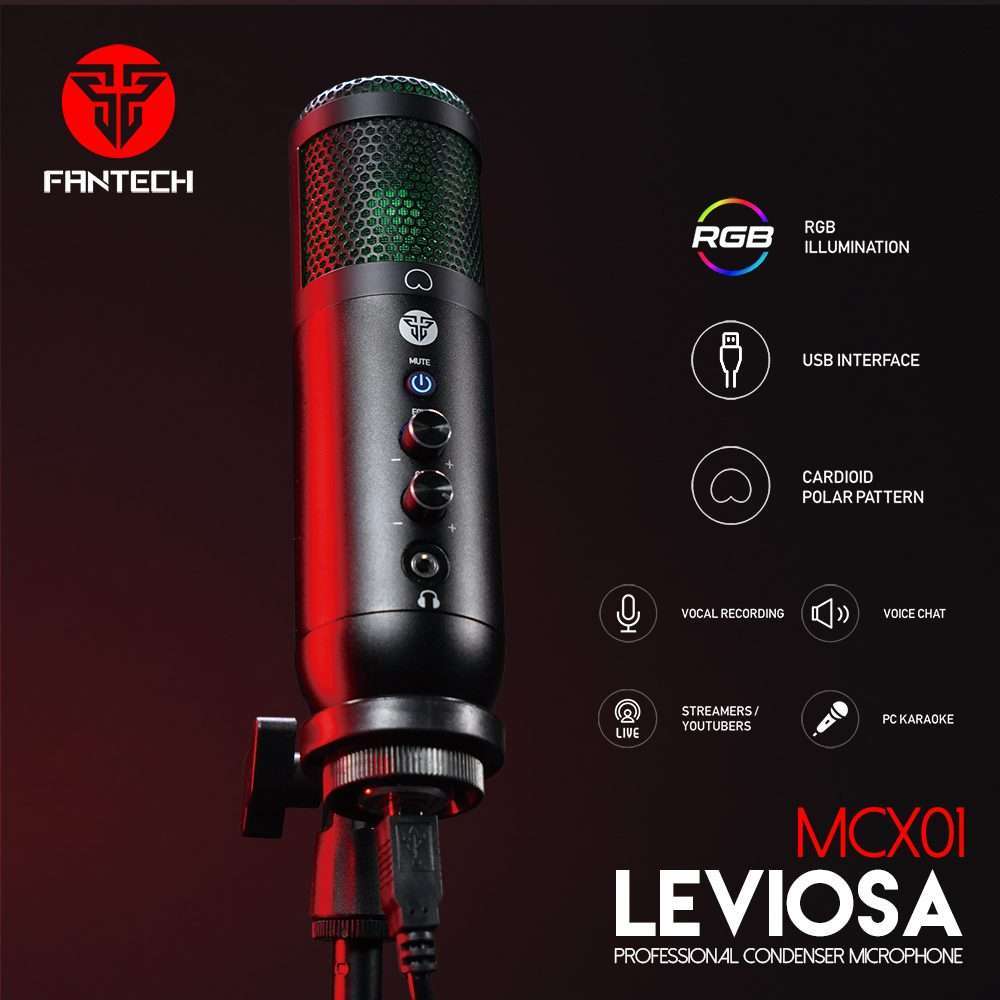
The Fantech MCX01 Leviosa is one of the most popular USB condenser microphones available in Nepal right now, and at ₨5,500, it’s hard to beat for the price. Whether you’re setting up your first streaming rig, recording a podcast from your bedroom, or just tired of laptop audio sounding hollow on Discord, this mic changes things quickly.
It runs entirely plug-and-play over USB. No drivers. No software installs. Just connect it, and your PC or laptop recognizes it instantly on Windows, macOS, PS4, and PS5. The cardioid capsule picks up your voice cleanly from the front while pushing background sound to the side, so your keyboard clicks, fan noise, and room echo stay where they belong: out of the recording.
Why streamers and YouTubers in Nepal choose the MCX01: It ships with a pop filter, a foldable tripod stand, and a 2.5m USB cable, everything you need to start recording on day one, without buying extras.
What Makes the Fantech MCX01 Leviosa Stand Out?
Cardioid Pattern: Focus on Your Voice, Not the Room
The MCX01 uses a cardioid polar pattern. That means it captures sound in a heart-shaped field directly in front of the microphone, and naturally rejects noise coming from the sides and rear. If you’re in a Nepali apartment where traffic noise bleeds through windows or your CPU fan runs loud, this single feature makes a noticeable difference. Your audience hears you, not everything else.
48kHz / 16-bit Sample Rate: Broadcast-Quality Resolution
Most entry-level USB mics record at 44.1kHz. The MCX01 steps up to a 48kHz sample rate at 16 bits — the same standard used in professional video production and broadcast audio. The result is a slightly more detailed, airier sound that doesn’t feel compressed. If you’re uploading to YouTube, streaming on Twitch, or recording voiceovers for reels, the difference shows up in how natural you sound.
RGB Lighting with a Purpose
The RGB lighting on the MCX01 isn’t purely cosmetic. In streaming and content creation, your desk setup is part of your brand, it’s visible in every thumbnail, every camera shot, every B-roll clip. The Leviosa’s RGB glow adds ambient color to your recording environment without requiring a separate LED strip or controller. It draws eyes to your microphone in the frame and adds depth to an otherwise flat-looking setup.
Plug-and-Play USB: Works on Day One
Connection is USB-A to USB-B with the cable included. There are no drivers to download, no app to configure, and no settings to dig through. Your operating system sees it as a standard USB audio device the moment you plug it in. This matters in Nepal where internet connections can be slow and driver download pages are often unreliable. Everything you need is already on the mic.
Complete Package in the Box
What’s included with the Fantech MCX01 Leviosa:
- MCX01 Leviosa RGB Condenser Microphone
- Foldable desktop tripod stand
- Pop filter (reduces plosive sounds from P, B, T sounds)
- USB-A to USB-B cable (2.5 metres)
- Mount adapter
- Instruction manual
- 1-year warranty card
Most USB mics at this price point ship with just the microphone and a cable. Fantech includes a pop filter and a proper tripod stand, which typically cost ₨500–₨1,000 separately. You’re getting a ready-to-use studio kit, not just a capsule on a wire.
Technical Specifications
| Microphone type | Professional condenser |
| Polar pattern | Cardioid |
| Frequency response | 20Hz – 20kHz |
| Sensitivity | -38dB ± 3dB |
| Impedance | 16Ω |
| Sample rate | 48kHz at 16 bit |
| Connection | USB-A to USB-B (cable included) |
| Cable length | 2.5 metres |
| Dimensions | 172 × 45.5 × 45.5mm |
| Weight | 252g |
| Lighting | RGB illumination |
| Driver requirement | None — plug-and-play |
| Compatible platforms | Windows, macOS, PS4, PS5, PC, Laptop |
| Not compatible with | Xbox, smartphones |
| Included accessories | Pop filter, foldable tripod, mount adapter, USB cable |
| Warranty | 1 year |
Who Should Buy the Fantech MCX01 Leviosa?
This microphone is a strong fit for a specific type of buyer: someone who’s ready to take their audio seriously but isn’t ready to spend ₨15,000+ on a dedicated audio interface and XLR microphone setup. It fills that gap well.
- Streamers and gamers: clean voice audio for Twitch, YouTube Live, or Discord team calls without breaking the budget
- YouTubers and content creators: voiceovers and talking-head videos benefit immediately from the condenser capsule’s detail
- Students and online educators: online classes, Zoom lectures, and recorded lessons sound more professional with a dedicated mic versus a laptop’s built-in one
- Podcasters just starting out: the cardioid pattern works well in small rooms and doesn’t demand acoustic treatment to sound decent
- Work-from-home professionals: important client calls and meetings sound sharper when you’re not relying on laptop mic compression
It’s not the right choice for recording instruments, capturing a full room, or multi-person setups. The cardioid pattern isn’t designed for those use cases. But for voice-forward recording, it performs well above its price.
How to Set Up the Fantech MCX01 on Your PC or Laptop?
Setup takes under two minutes. Here’s the full process:
- Unfold the tripod legs and place the mic on your desk, roughly 15–25cm from your mouth.
- Attach the pop filter to the tripod arm using the mount adapter so it sits between your mouth and the capsule.
- Plug the USB-B end of the cable into the microphone and the USB-A end into your PC or laptop.
- Windows will show a “USB Audio Device” notification within a few seconds. No driver install required.
- Open your sound settings and set “USB Audio Device” as the default input. On Windows 11, go to Settings → System → Sound → Input.
- In OBS Studio, set your audio input capture to “USB Audio Device” (or “Fantech MCX01” if it appears by name).
- Check your levels: aim to keep the input meter peaking around -12dB to -6dB during normal speaking. Adjust Windows microphone gain if needed.
For PS4 and PS5, plug directly into any USB port. Go to Settings → Devices → Audio Devices and select the MCX01 as your input device. No additional configuration is needed.
Frequently Asked Questions
Does the Fantech MCX01 work without installing any drivers?
Yes, the MCX01 is completely plug-and-play on Windows 7, Windows 10, Windows 11, and macOS. Your system recognizes it as a standard USB audio device the moment you connect it. You don’t need to download anything from Fantech’s website or install any companion software.
Is the Fantech MCX01 compatible with OBS Studio for streaming?
Yes, open OBS, go to Settings → Audio, and select “USB Audio Device” or “Fantech MCX01” as your microphone input. The 48kHz sample rate matches OBS’s default audio settings, so no additional configuration is needed. Many Nepali streamers run it on OBS without issues.
Can I use this microphone with my PS4 or PS5?
Yes, plug it into any available USB port on the console. On PS5, go to Settings → Sound → Microphone and select the MCX01. On PS4, go to Settings → Devices → Audio Devices. Note that it does not work with Xbox consoles or smartphones.
How far should I sit from the Fantech MCX01?
For the clearest voice capture, position yourself 15 to 25 centimetres (roughly one hand-width to one forearm-length) directly in front of the microphone. The cardioid pattern’s sweet spot is tight; sitting too far back makes your voice sound thin, and sitting too close can cause distortion on loud consonants even with the pop filter attached.
What is the difference between a condenser and a dynamic microphone?
Condenser microphones like the MCX01 use a thin, electrically charged diaphragm that responds to very small air-pressure changes. They’re more sensitive and capture more detail, making them ideal for voice recording, streaming, and podcasting in a quiet or treated room. Dynamic microphones are less sensitive but more forgiving in loud, untreated environments like live stages. For home use and streaming, a condenser is generally the better starting point.
Does the MCX01 Leviosa pick up background noise from fans or traffic?
The cardioid pattern significantly rejects sound from the rear and sides, reducing ambient noise from behind you. However, like all condenser mics, it is sensitive a loud CPU fan directly beside the mic or a room with poor acoustics will still show up in recordings. Positioning the mic so that the to sound sources you want to reject face the rear of the capsule helps considerably.
Buy the Fantech MCX01 Leviosa in Nepal
The Fantech MCX01 Leviosa is available at the LNIT Hub at ₨5,500, down from the original ₨10,500. It ships with the full accessory kit: tripod, pop filter, USB cable, and mount adapter, so you’re covered from the moment it arrives. Warranty is 1 year from the date of purchase. If you’re in Kathmandu, you can pick it up directly from our store at Pako Sadak, New Road. Online orders are accepted across Nepal. Call +977-9844390621 or message us on WhatsApp to confirm stock and delivery time before ordering.




Reviews
There are no reviews yet.