

Best Laptop for Video Editors in Nepal: Specs and Price Guide (2026)
Video editing is one of the fastest-growing digital skills in Nepal, and the demand for high-quality content is increasing across YouTube, filmmaking, advertising, and social media. But editing smoothly requires more than just talent; you also need the right Laptops.
Ask anyone who has tried rendering a 4K timeline on an underpowered laptop. Exports become painfully slow, previews lag constantly, and even simple edits feel frustrating. A powerful laptop saves time, improves workflow, and lets you focus on creativity instead of waiting for renders to finish.
If you are a Nepali content creator, filmmaker, freelancer, or YouTube editor searching for the best laptop for video editing in Nepal, this 2026 guide covers the ideal specs, recommended configurations, and expected price ranges for different editing needs and budgets
What Specs Does a Video Editing Laptop Actually Need?
Before jumping to laptop names, let’s talk hardware. Video editing is one of the most demanding tasks you can throw at a laptop. Here is what matters most:
Processor (CPU)
The CPU handles timeline scrubbing, real-time previews, and effects processing. For video editing, you want at least an Intel Core i5 (13th Gen or newer) or an AMD Ryzen 5 7000-series and above. For heavy 4K or multi-cam work, an Intel Core i7 or AMD Ryzen 7 is the sweet spot.
According to Intel’s own documentation, the 13th Gen Core i7 processors offer significant performance gains for multi-threaded workloads like video rendering compared to previous generations, which is exactly the kind of task editors run daily.
RAM
This is where most budget laptops fail video editors. 8GB RAM is the bare minimum, but it will hurt you the moment you open a heavy project in DaVinci Resolve or Adobe Premiere Pro. 16GB RAM is the recommended starting point for editing 1080p footage comfortably. For 4K work, 32GB is ideal.
Storage (SSD)
Slow storage kills your workflow. A traditional HDD will cause constant lag when reading large video files. You need an NVMe SSD of at least 512GB, though 1TB is much more practical. Video files are large. A single hour of 4K footage can eat up 50–100GB, depending on the codec.
Display
Colour accuracy matters for editors. Look for a display that covers at least 100% sRGB or, better yet, a DCI-P3 colour space. OLED panels deliver stunning contrast but IPS panels with wide colour gamut coverage are also perfectly usable. Resolution-wise, Full HD (1920×1080) works fine for most editors, but WUXGA (1920×1200) or 2K panels give you more vertical screen real estate.
GPU (Dedicated vs. Integrated)
A dedicated GPU significantly speeds up GPU-accelerated effects and encoding in apps like Premiere Pro and DaVinci Resolve. NVIDIA’s CUDA acceleration is widely supported. Even a mid-range card like the RTX 3050 or RTX 4050 makes a real difference over integrated graphics.
Best Laptop for Video Editing Available in Nepal
Here are real options you can buy Best Laptop for Video Editing right now, with verified specs and prices from LNIT Hub in Kathmandu.
1. Acer Nitro V 16 2024: Best Overall Value for Editors
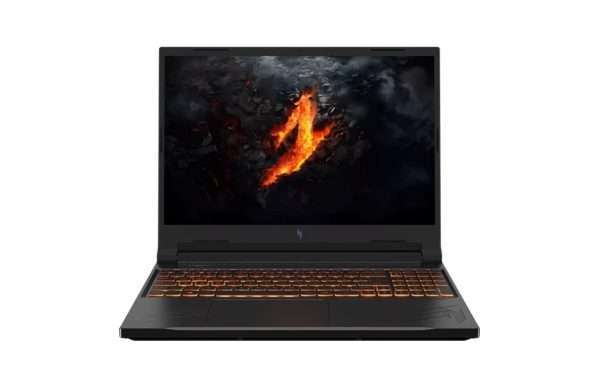
Price: NPR 1,41,000 (down from NPR 1,45,000)
Specs:
- AMD Ryzen 7 8845HS Processor
- 16GB RAM
- 512GB SSD
- NVIDIA GeForce RTX 4050 6GB Graphics
- 16-inch WUXGA (1920×1200) IPS Display at 165Hz
- 1 Year Warranty
This one is a genuinely strong pick for video editors. The Ryzen 7 8845HS is a powerful chip. AMD’s Ryzen 7 8000-series processors use an efficient hybrid architecture that performs excellently in both single-core and multi-core tasks. The RTX 4050 gives you proper GPU acceleration for Adobe Premiere and DaVinci Resolve. The 165Hz display is a nice bonus (no, you are not editing at 165fps, but the panel quality is better).
The WUXGA panel gives you more vertical space for timeline work, which any editor will appreciate after about ten minutes of use. 16GB RAM at this price point is solid, and the RTX 4050 with 6GB VRAM handles effects rendering without breaking a sweat.
Best for: YouTube creators, freelance editors, and content creators working with 1080p to 4K footage.
2. ASUS VivoBook 16 X1605VA: Best Mid-Range Pick
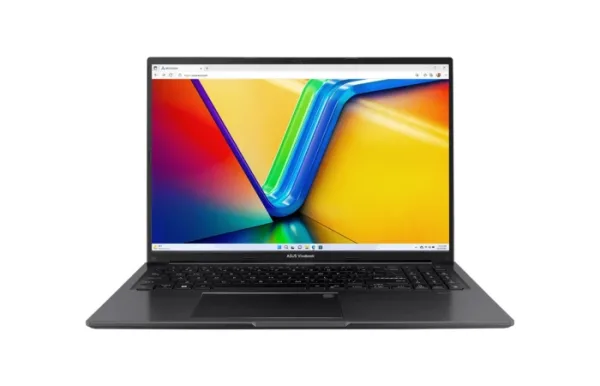
Price: NPR 93,000 (down from NPR 98,000)
Specs:
- 13th Gen Intel Core i5-13420H Processor
- 16GB RAM
- 512GB SSD
- Intel Iris Xe Graphics
- 16-inch WUXGA (1920×1200) IPS Display
- 2 Years Authorized Warranty + 1 Year ASUS Perfect Warranty
At under NPR 1 lakh, this is one of the more capable editing laptops available. The i5-13420H is a capable processor for 1080p editing work it handles Premiere Pro, CapCut, and Filmora without complaint. The 16GB RAM ensures your system does not choke midway through a project.
The downside? No dedicated GPU. Intel Iris Xe integrated graphics handles lighter tasks fine, but do not expect fast GPU-accelerated rendering in DaVinci Resolve for heavy 4K footage. For editors primarily working in 1080p with standard colour grades, this machine works well.
The 16-inch WUXGA panel is genuinely useful for editing wider than a standard 15.6″ screen with better proportions for timeline navigation.
Best for: Student editors, beginner content creators, 1080p YouTube editors on a budget.
3. Acer Nitro Lite 16 2025: Best for Serious 4K Work
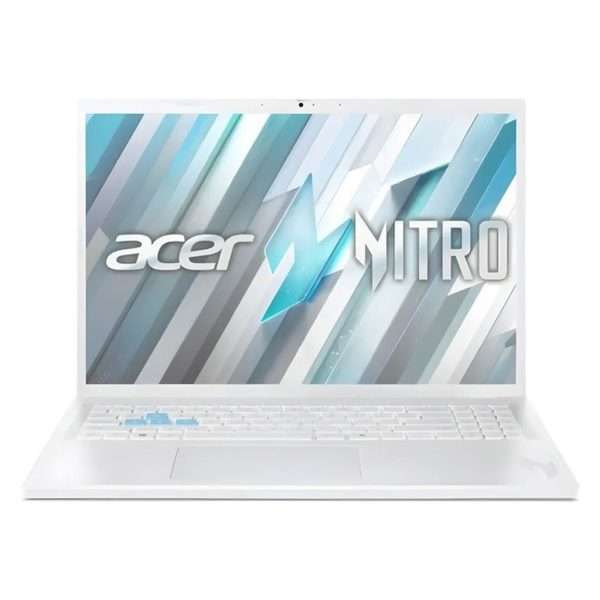
Price: NPR 1,46,000 (down from NPR 1,55,000)
Specs:
- Intel Core i7-13620H Processor
- NVIDIA GeForce RTX 4050 Graphics
- 16-inch Display
- 1 Year Warranty
The i7-13620H is a serious chip for editing. It combines 6 performance cores with 6 efficiency cores, making multi-threaded rendering notably faster than i5 options. Paired with the RTX 4050, this handles 4K timelines in Premiere Pro and DaVinci Resolve with confidence. If you are dealing with colour grading, VFX work, or multi-camera editing regularly, this is where it makes sense to invest.
Best for: Professional editors, cinematographers, 4K content creators.
4. ASUS Vivobook V16: Premium Pick with RTX 5050
Price: NPR 2,07,999 (down from NPR 2,10,000)
Specs:
- Intel Core 7 240H Processor
- 16GB RAM
- 512GB SSD
- NVIDIA GeForce RTX 5050 8GB Graphics
- 16-inch WUXGA Display
- Windows 11
The RTX 5050 is NVIDIA’s newer generation GPU built on the Blackwell architecture. It brings improved performance per watt and better AI-accelerated features compared to the 40-series. For editors who work in applications that leverage DLSS or AI noise removal (like DaVinci Resolve’s Magic Mask or Premiere’s AI features), this is the best laptop in Nepal to choose.
The Intel Core i7 240H is also a newer generation chip, making this an excellent long-term investment if your budget allows.
Best for: Power users, professional video production studios, editors who want hardware that stays relevant for 4–5 years.
5. HP Pavilion Plus 14: Best for Portability with Display Quality
Price: NPR 1,27,000 (down from NPR 1,32,000)
Specs:
- Intel Core i7-13700H Processor (13th Gen)
- 16GB RAM
- 512GB SSD
- Intel Iris Xe Graphics
- 14-inch 2.8K Display
The real headline here is the 2.8K display. For colour-accurate editing work especially if you export content for social media where colour grading matters this panel quality is excellent at this price range. The i7-13700H is a strong processor that handles 1080p and moderate 4K editing well.
The tradeoff is still the lack of a dedicated GPU, which limits intensive rendering speed. But for editors who rely more on CPU performance and want a laptop they can carry around comfortably, HP Pavilion Plus 14-inch machine makes strong sense.
Best for: Travel-friendly editing, social media creators who prioritise display quality, editors who work on location.
Quick Comparison
| Laptop | Price (NPR) | RAM | GPU | Best For |
| Acer Nitro V 16 2024 | 1,41,000 | 16GB | RTX 4050 | Best overall value |
| ASUS VivoBook 16 X1605VA | 93,000 | 16GB | Intel Iris Xe | Budget 1080p editing |
| Acer Nitro Lite 16 2025 | 1,46,000 | — | RTX 4050 | Serious 4K work |
| ASUS Vivobook V16 (RTX 5050) | 2,07,999 | 16GB | RTX 5050 | Professional power users |
| HP Pavilion Plus 14 | 1,27,000 | 16GB | Intel Iris Xe | Portability + display quality |
Things to Keep in Mind Before Buying
Upgrade potential matters. Some laptops allow you to add more RAM later. If you are buying a mid-range machine today, check whether the RAM slots are upgradeable. Going from 16GB to 32GB later can extend a laptop’s useful life by years.
Software matters too. DaVinci Resolve and Adobe Premiere Pro both leverage GPU acceleration heavily. If you use these tools daily, a dedicated NVIDIA GPU is worth paying for. If you primarily use CapCut, Filmora, or similar lighter tools, integrated graphics might be sufficient.
Power supply in Nepal. Video editing pushes laptops hard, and hot ambient temperatures in the Terai or during Nepal’s summer can affect thermal performance. Laptops with good cooling (like the Nitro V series, which is designed with gaming-grade thermals) tend to sustain performance better during long rendering sessions.
Warranty and after-sales. Buying from an authorised store matters in Nepal. LNIT Hub offers warranties from 1 to 2 years, depending on the model, with ASUS even offering an additional “Perfect Warranty” on select models. Always verify warranty terms before purchase.
Conclusion
If you want the best balance of performance and price for video editing in Nepal in 2026, the Acer Nitro V 16 2024 at NPR 1,41,000 is the strongest pick. You get a Ryzen 7 chip, RTX 4050, 16GB RAM, and a 16-inch WUXGA display; that combination handles everything from YouTube editing to 4K production work.
On a tighter budget, the ASUS VivoBook 16 X1605VA at NPR 93,000 delivers solid 1080p editing capability with 16GB RAM and a great 16-inch display for under NPR 1 lakh.
And if money is not the primary constraint, the ASUS Vivobook V16 with RTX 5050 is where the future sits: newer GPU architecture, more VRAM, and a processor built for the demands of modern AI-powered editing workflows.
Choose Best Laptop for Video Editing based on your actual workload, not the one that sounds most impressive in the shop.

Add comment